The spell checker included with Help+Manual supports both manual spell checking (check topics or the entire project in a single session) and "live" spell checking, which highlights incorrectly spelled words as you type.
See Spell checking in the Creating and Editing Topics chapter for instructions on using both manual and live spell checking functions.
Open Office dictionaries
The spell checker uses Open Office dictionaries for spell checking and hyphenation. These dictionaries are free and are available for a very large number of languages.
Productivity Tip
Spell checking is supported almost everywhere in Help+Manual where you can enter text. Just right-click to display the context menu or click on the upper half of the Spelling tool in the Project tab to access.
The Spelling tool in the Project tab is available almost everywhere in Help+Manual where you can enter text, including the HTML editors for HTML templates and code objects, the XML editor, the TOC captions in text entry mode and all of the text entry fields in the Configuration section of your project.
•Clicking on the top half of the Spelling tool checks selected text (if any is selected) OR the current topic or text entry field or window (if no text is selected).
•Clicking the bottom half of the Spelling tool displays the spell-check menu.
Select Tools > Spelling > Configure Spell Checker, then configure your options in the User Preferences tab.
Most of the settings here are self-explanatory. Here are a couple of notes on special functions:
Live spelling: Identifies incorrect words with squiggly red underlines while you are working. Right-click on words with these underlines to display a spell-check menu. Does not support repeated words and dual capitals (see below)
Main dictionary only: When this is active suggested corrections will be taken from the main dictionary for the current language only. No suggestions will be taken from your own user dictionaries.
Prompt on repeated word, correct Dual capitals: These functions are not active for live spell checking. They are only supported in the interactive spell check started from with the Spelling tool in the Ribbon.
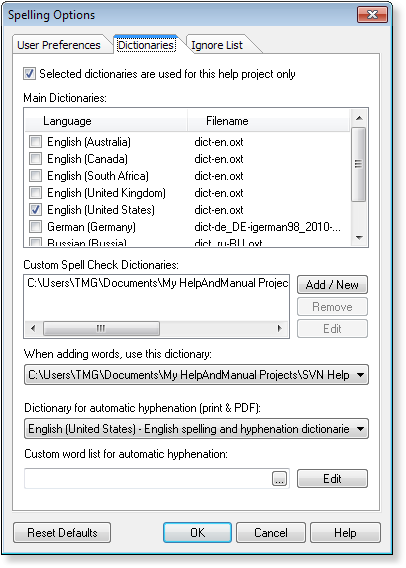
Select Tools > Spelling > Configure Spell Checker, then select the dictionary for the language of your project in the Dictionaries tab.
To add dictionaries for more languages click on Download dictionaries... These dictionary files must be unpacked (if they are in a zip or other archive file) and saved in the \dictionaries folder in the Help+Manual program directory.
Note that the download page for the OpenOffice dictionaries is often unavailable. If you can't access it you may have to wait a while and try again.
Select the user dictionaries:
All user dictionaries listed in the Custom Dictionaries section will also be used for spell checks. You can store these dictionaries anywhere you want, also on network drives, and multiple users can access the same dictionary at the same time.
Select When adding words, use this dictionary: to choose the user dictionary you want to use to store new words.
Hyphenation dictionary is a separate selection:
Note that you need to select the dictionary to be used for automatic hyphenation in PDF and DOCX separately. Note also that there are no configuration options for hyphenation beyond the custom word list with which you can specify how specific words are to be hyphenated, and words that are not to be hyphenated. Beyond that all aspects of hyphenation are controlled by the Open Office hyphenation dictionaries used by Help+Manual.
Styles excluded from spell checking are also excluded from hyphenation
No hyphenation is performed on text formatted with styles that are excluded from spell checking. You can thus disable hyphenation for any text by formatting it with one of the styles you have excluded from spell checking. See Disabling spell checking for specific styles further below for details on this.
The OpenOffice spelling dictionaries also support automatic hyphenation, which is used in printed manuals, DOCX and PDF output. You need to select the dictionary you want to use in the Dictionaries tab (see screenshot on right).
Hyphenation word lists
You can create a list of words that you want to exclude from hyphenation or hyphenate in a special way. Click on the Edit button in the Custom Word List section at the bottom of the spell checker configuration dialog to display the editor. Beyond this, all aspects of hyphenation are controlled automatically by the Open Office hyphenation dictionaries.
Creating word lists in a text editor
You can also create your own word list with a text editor and load it with the browse button in the Custom Word List section:
•Just create a plain text file with one word on each line.
•Insert equals signs (=) in the positions where you want hyphens to be possible. For example re=dun=dant allows two possible hyphenations.
•Words without equal signs on the list will be excluded from hyphenation, i.e. they will never be hyphenated.
•The list is case-sensitive. You must include both capitalized and uncapitalized versions of your words if this is relevant for you.
Links are excluded from hyphenation
Internet and email links are automatically excluded from hyphenation.
Styles excluded from spell checking are also excluded from hyphenation
No hyphenation is performed on text formatted with styles that are excluded from spell checking. You can thus disable hyphenation for any text by formatting it with one of the styles you have excluded from spell checking. See Disabling spell checking for specific styles further below in this topic for instructions.
The main dictionaries are not editable. However, you can create custom user dictionaries to store your own additional terms. These dictionaries can also store auto-correct word pairs and "excluded" words that you want to always identify as incorrect even if they are in the main dictionary.
•The standard user dictionary is stored in your My Documents folder (called Documents in Windows Vista). To use this just select it in the When adding words, use this dictionary list at the bottom of the dialog.
•Click on Add/New to create a new user dictionary or to select an existing dictionary. You can store your dictionary anywhere you like.
•If you only want to use the selected dictionaries for the current project activate Selected dictionaries are used for this help project only. Otherwise your selections will be stored for all projects.
The settings in the Ignore List tab exclude text formatted with specific styles from both spell checking and hyphenation. This makes it possible to prevent spell checking for text where it would not make sense, for example in quoted text in other languages. You can also use this feature to prevent hyphenation for any text.
1.Select Tools > Spelling > Configure Spell Checker and click on the Ignore List tab.
2.Select the check boxes of all the styles you want to exclude from checking.
All text formatted with the selected styles will be ignored by the spell checker.
Styles excluded from spell checking are also excluded from hyphenation
Again, note that no hyphenation is performed on text formatted with styles that are excluded from spell checking. You can thus disable hyphenation for any text by formatting it with one of the styles you have excluded from spell checking.