The main Help+Manual window
The Help+Manual window has four main components: The File Menu, the Ribbon Toolbar, the Project Explorer and the Editor Window.
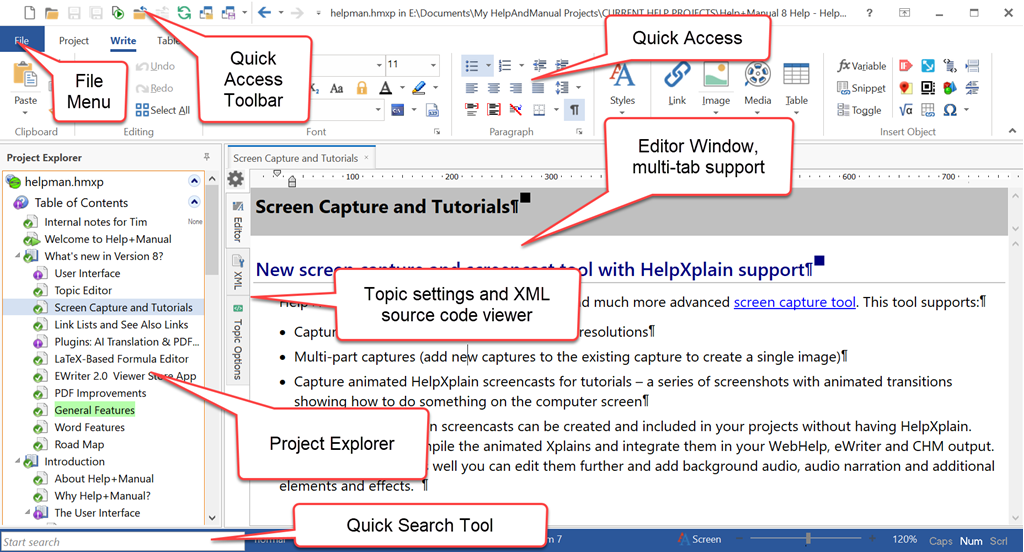
The Help+Manual user interface
The File Menu
The File menu switches to a special interface for file-related operations like creating new projects, publishing your projects and importing data. It includes functions like creating new projects, publishing your projects to different formats, printing user manuals and saving your projects in different formats for different purposes.
The Quick Search Tool
This tool in the lower left of the program window provides instant access to any Help+Manual function, tool or project. Just type the first couple of letters of the name of what you want in the tool and then select it from the list displayed.
You can select the tool with CTRL+SPACE. If this key combination is already assigned on your computer you can change it in View > Program Options > Shortcuts.
The Ribbon Toolbar
Help+Manual's functions are accessed primarily through the Ribbon Toolbar (or Ribbon for short). It is divided into tabs that group functions according to tasks.
The Project Explorer
The Project Explorer provides access to all the components of your project, including the table of contents, your topic files, other project files and all the settings and templates associated with your project.
The Editor
The editor is where you do all your editing work. You will spend most of your time here editing topics, working as you do in a normal word processor. However, this is also where your project options and settings are displayed when you select the Configuration sections of your project in the Project Explorer.